Troodon Application
Troodon is an application that provides various AI models on a single platform, offering both monthly subscription and pay-as-you-go options. It suggests the best AI model based on the topic of the question asked and also allows users to ask questions to multiple language models and compare the responses.
This project was developed in collaboration with two students from Sharif University and is currently under development.

Presentation of the Site
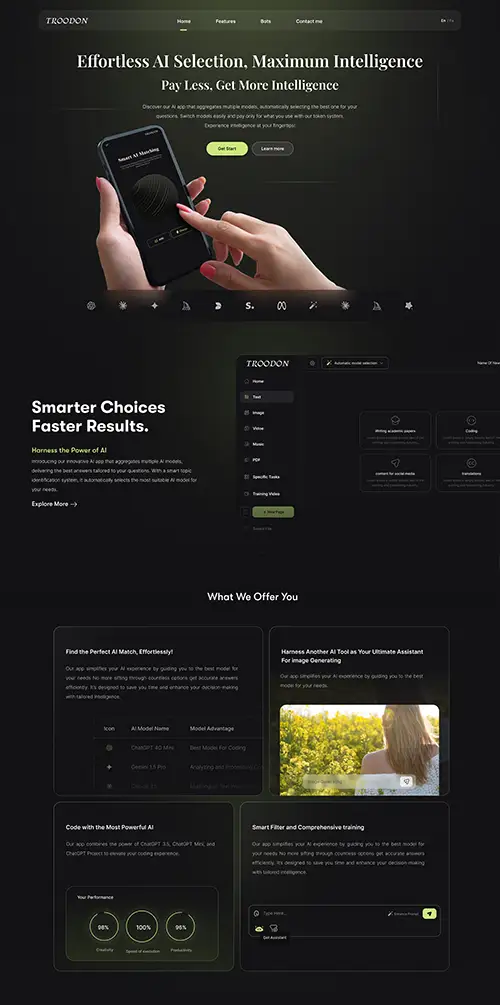
Introduction
Troodon, as mentioned above, is a web application offering various language models developed by a team of students from Sharif University of Technology. This platform is designed to provide a collection of AI models in a unified environment, allowing users to easily access and benefit from the capabilities of different types of artificial intelligence.
During the research and development phase, our focus was on market analysis and identifying user needs. Our goal was to understand user experiences and the challenges they face when working with AI tools. Some of the areas we explored included how users interact with different models, limitations of existing platforms, the need to compare model performances, and challenges related to cost and accessibility.
My Role
I was responsible for UX Research & Design. In this capacity:
- I conducted interviews with target users to gain a better understanding of their needs and expectations.
- I performed needs assessment and competitive analysis to identify the strengths and weaknesses of similar systems.
- I documented user challenges and provided design solutions to create an optimal user experience.
- I was responsible for designing the main page and core of the application, ensuring that the final product was of high usability and aesthetics.
Design Thinking Process
Quantitative analysis involves studying user behavior through numbers, charts, and statistical patterns. Using advanced data-tracking tools, I analyze user flows and identify weak points and opportunities for improvement.
Google Analytics 4 (GA4) – Tracking Data & User Journey Analysis
- Setting up and managing Event Tracking to monitor key user interactions such as CTA button clicks, scroll depth, video views, form submissions, and more.
- Conducting User Flow Analysis to visualize user movement across the site and detect drop-off points.
- Utilizing Conversion Funnel Analysis to identify where users are abandoning key processes.
- Implementing Cohort Analysis to examine user behavior over different time periods and measure retention rates.
- Creating Custom Segments & Audiences to target specific user groups based on their behavior.
- Managing UTM Tracking to measure the impact of marketing campaigns on user conversions.
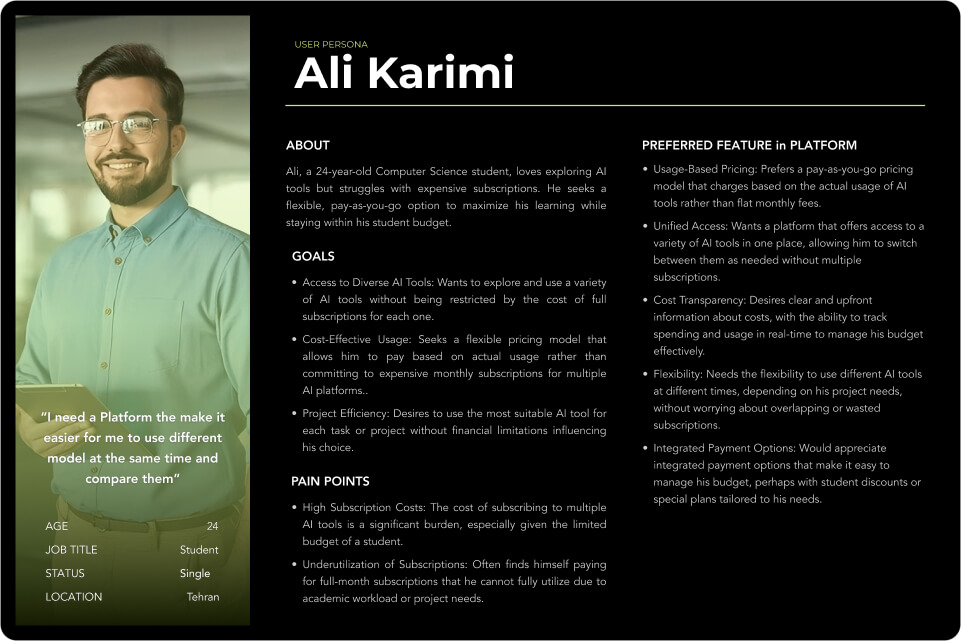
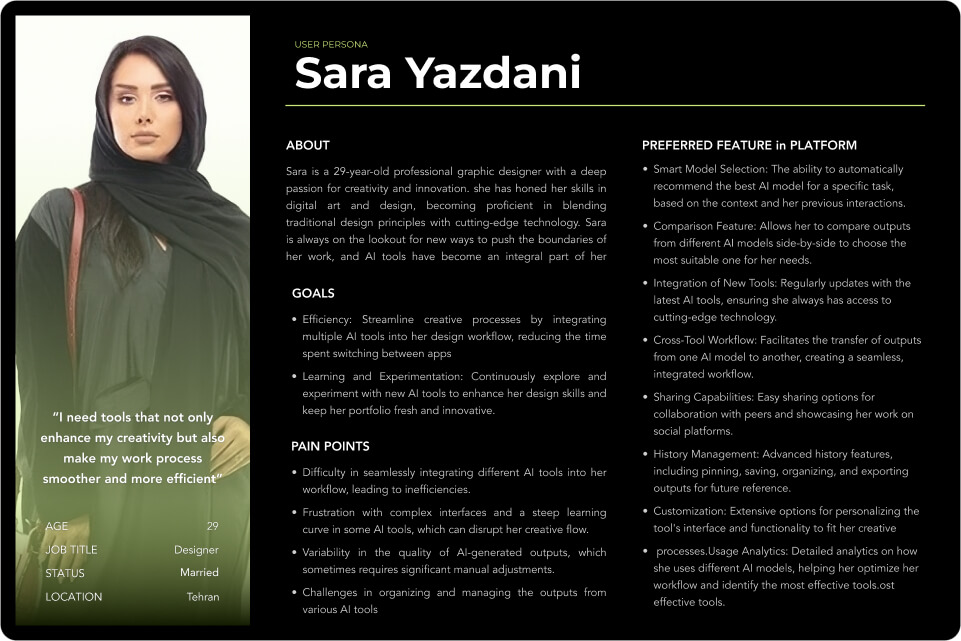
User Persona
User Journey Map
We analyze the entire user experience through a User Journey Map to identify Problem statements and challenges along the way.
Problem statement
Users need a way to easily compare and choose the right AI model for their specific tasks because the overwhelming variety of AI tools makes it difficult to identify the best option, which results in inefficient usage.
Students who frequently use AI tools are frustrated by the high cost of subscription plans, which limits their ability to explore and test multiple AI models, resulting in restricted access to more advanced or specialized tools.
Many AI tools, especially in image generation, fail to fully understand users’ specific needs and requests, leading to unsatisfactory results, particularly in creative tasks like design
Users are unaware of specialized AI tools that could be more suited to their specific tasks, such as coding, which causes them to rely on generalized models like ChatGPT, reducing productivity and efficiency
Desifne Phase
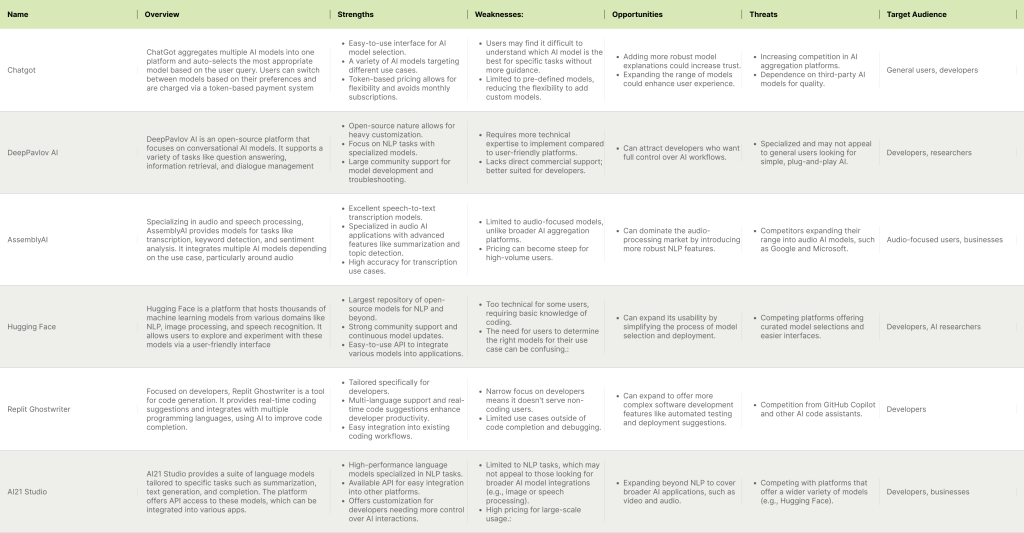
In the second phase of Design Thinking, Define, we conducted a competitive audit and brainstorming session.
Competitive Audit
The primary goal of this competitive audit is to understand how other platforms, similar to ours, handle the variety of AI models they offer. In particular, we aim to identify strategies that these platforms use to overcome challenges in AI-generated outputs, such as models failing to understand user intent—especially in image generation tasks where the AI
doesn’t accurately capture the user’s vision.
After analyzing competitive, brainstorming and and “How Might We” questions we define some solutions for each problem statements.
Result of Competitive Audit
Result of Competitive Audit
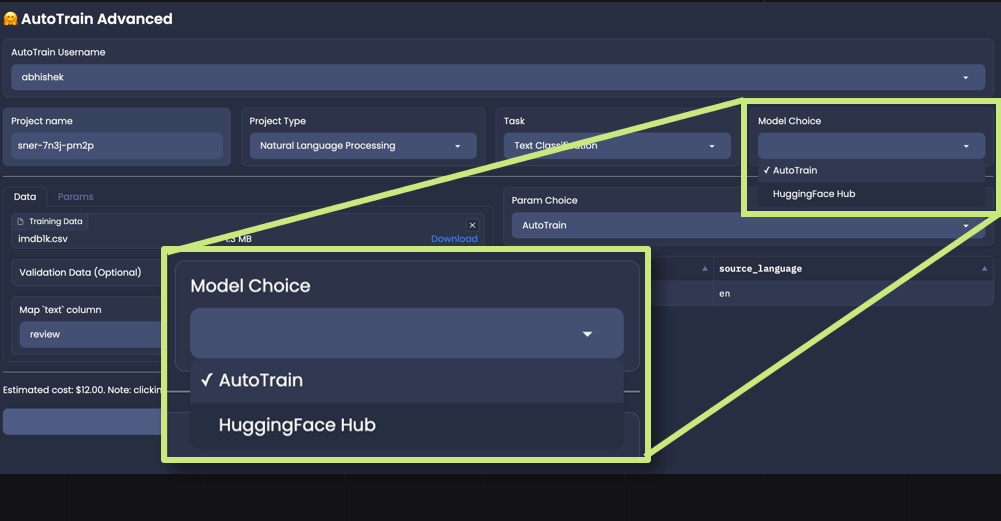
One competitor we analyzed was Hugging Face, a platform similar to ours, offering various language models. Hugging Face has a feature where it suggests the best AI model for a given task. This could address the issue faced by users like Sara, whose AI models fail to meet their expectations. However, it was unclear how Hugging Face determines the best model, and we couldn’t access their data. After further research, we found that Stanford University has developed a benchmark that identifies the best language model for each topic, which validated our idea of automatic model selection.
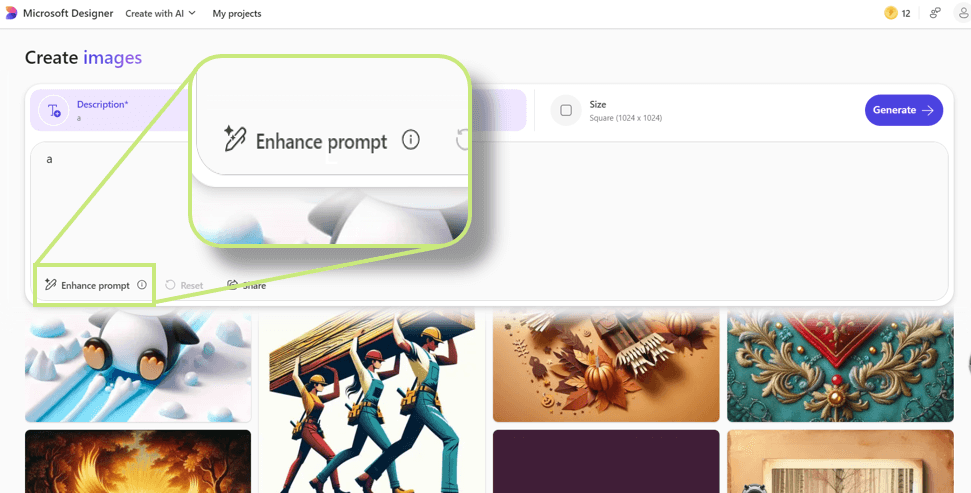
Another competitor was Microsoft Designer, an image generation app. While not a comprehensive AI platform, it helps users improve their prompts. However, it was unclear how keyword suggestions were chosen to optimize the prompt. This led us to propose an AI assistant that could refine user prompts to better communicate with image generation models.
Ideate Phase
(How Might We Questions) Brainstorming session
In pursuit of more solutions, we held brainstorming sessions using the How Might We technique. In these sessions, we followed four methods for generating “How Might We” questions, and each team member contributed as many solutions as possible.
How Might We… (using AMP up the good)
(Focus on enhancing the positive aspects)
How might we make it easier for users to discover the right AI models through improved visibility and guidance?
- Provide AI model recommendations based on user preferences and past successful projects.
- Implement a visual dashboard that highlights the most commonly used AI models for specific tasks.
- Introduce a smart search feature that filters models based on performance metrics relevant to the user’s task.
How Might We… (using Explore the Opposite)
(Flip the problem to understand it from a completely different angle)
How might we make the overwhelming variety of AI models a strength rather than a limitation?
- Design a “Random AI model” generator that suggests a new model each time, encouraging exploration and discovery.
- Create a mode where users can experiment with multiple AI models simultaneously and compare the outcomes.
- Use AI to automatically match and suggest a few contrasting models, showing differences and letting users choose based on comparative performance.
How Might We… (using Change the Status Quo)
(Question the default process and innovate with a fresh approach)
How might we transform the current way users select AI models into a more intuitive and time-efficient process?
- Replace complex AI selection lists with a simple flowchart or decision tree that guides users step by step.
- Implement a model selection wizard that asks for user requirements and outputs only the top 3 models.
- Allow AI to automate the comparison process and directly suggest the optimal model based on the user’s task.
How Might We… (using Break the Point of View into Pieces)
(Dissect the problem into smaller aspects and address each separately)
How might we make model comparison easier by addressing the different challenges in the decision-making process?
- Address choice overload by organizing AI models into clear categories, such as “image generation” or “text analysis.”
- Provide users with more transparent model performance data, including pros, cons, and success rates for specific tasks.
- Build an intuitive AI comparison tool that automatically displays differences in model architecture and features.
- Create a model “comparison board” where users can add up to three models and directly compare their performance on test data.
Solutions
Problem Statement 1:
Users need a way to easily compare and choose the right AI model for their specific tasks because the overwhelming variety of AI tools makes it difficult to identify the best option, resulting in inefficient usage.
Solution:
- We will leverage Stanford University’s AI model benchmark to recommend the best language model based on the user’s query. First, the app will identify the query’s topic and then suggest the most appropriate language model.
- Another solution is pre-defining model categories for specific tasks. For example, if a user wants to code, they can be directed to a section where the best language model for coding is already suggested.
- Additionally, we will implement a feature that allows users to switch between language models directly within the same page for each query, enabling easy side-by-side comparisons of different models.
Problem Statement 2:
Students who frequently use AI tools are frustrated by the high cost of subscription plans, which limits their ability to explore and test multiple AI models, resulting in restricted access to more advanced or specialized tools.
Solution:
We will introduce a token-based payment system. Instead of subscribing to an entire AI model on a monthly basis, users can purchase tokens to use only the specific features or models they need, making access more affordable and flexible. This system will allow students and other users to test and explore a variety of models without committing to expensive subscription plans.
Problem Statement 3:
Many AI tools, especially in image generation, fail to fully understand users’ specific needs and requests, leading to unsatisfactory results, particularly in creative tasks like design.
Solution:
- We will incorporate an AI assistant as a mediator. This assistant, powered by a language model like ChatGPT, will act as a translator between the user and the image generation AI (e.g., MidJourney). Users will provide the assistant with their requests, and the assistant will generate the optimal prompt for the image generator, ensuring that the output is closer to the user’s expectations.
- Additionally, we will provide prompt enhancement guides. For instance, we’ll offer documentation or visual guides explaining how adding certain keywords (e.g., “close-up” or “wide-angle”) to the prompt can improve the image results. These guides will help users refine their inputs based on real examples and best practices.
Problem Statement 4:
Users are unaware of specialized AI tools that could be more suited to their specific tasks, such as coding, which causes them to rely on generalized models like ChatGPT, reducing productivity and efficiency.
Solution:
- We will keep our platform continuously updated with the latest language models, ensuring that users have access to a wide variety of AI tools that are specialized for different tasks. By increasing the variety of models and introducing new ones, we will help users discover more tailored solutions for their specific needs beyond general models like ChatGPT.
Prototyping Phase
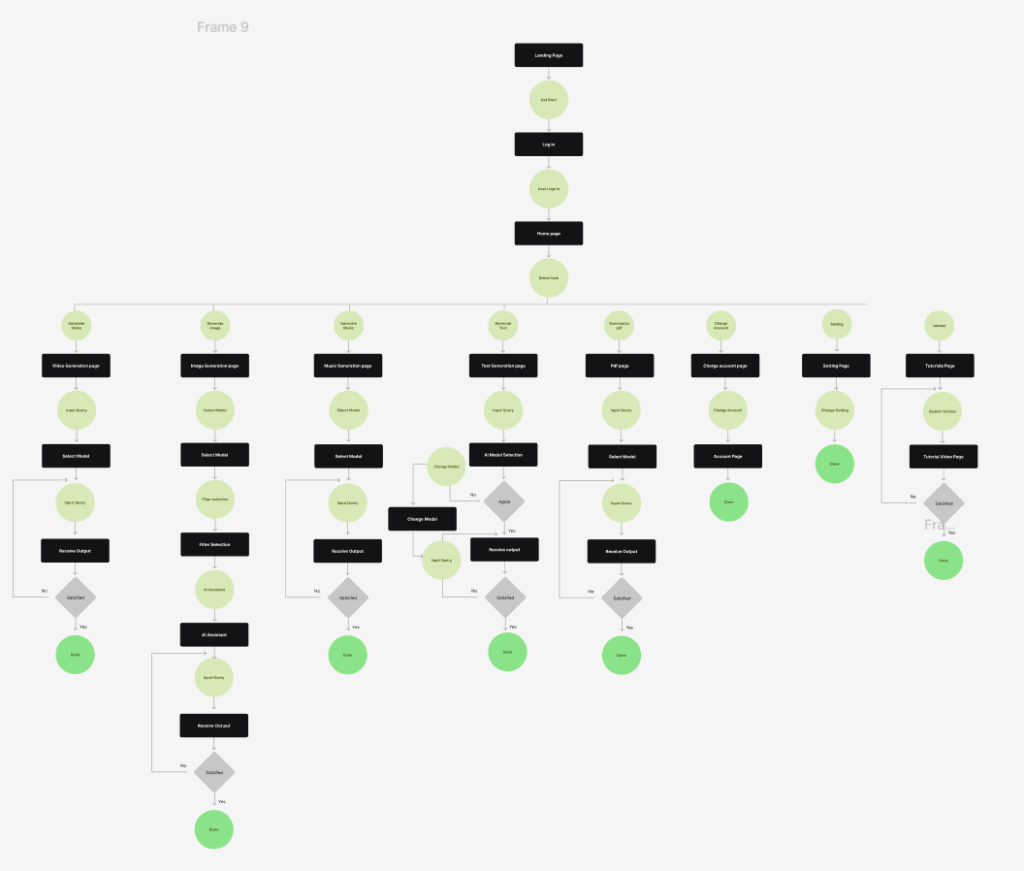
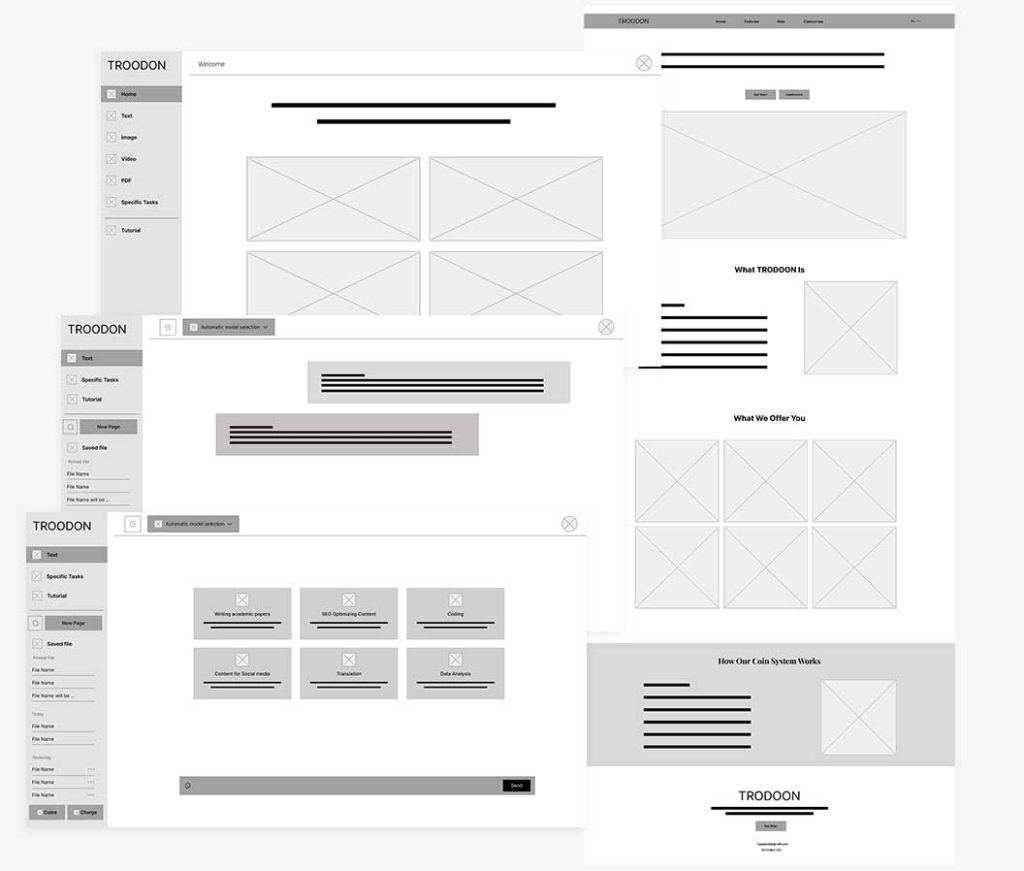
User Flow and Wireframe